
Product Description
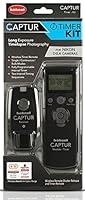
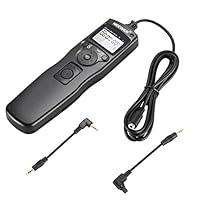
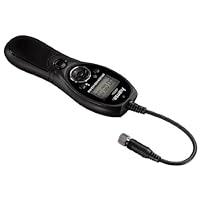
AODELAN WTR-2 will work as a timer and remote shutter release.Besides the full functions of shutter release, it also features multiply timer functions:delay timer, Iong exposure timer, interval timer as well as setting for the number of exposure;its timing setting can be accurate to 0.1 seconds.AODELAN Camera Wireless Shutter Release Timer Remote Control is great for time-lapse recording of blooming flowers, astrophotography and etc.
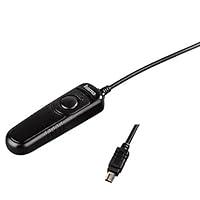
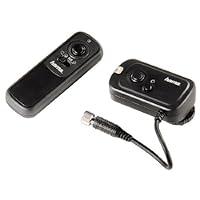
AODELAN WTR-2 includes a Timer WTR-2(T) and a Receiver WTR-2(R). It works as a wireless timer and remote shutter release system with the Receiver WTR-2(R) connecting to the camera and the Timer WTR-2(T) controlling the receiver. Also, the Timer WTR-2(T) can work as a wired system with it connecting to the camera directly.
Changing modes on AODELAN WTR2 Camera Wireless Shutter Release
Press the Sound/Mode Button to cycle between modes. A small indicator line will appear on the LCD over the selection. The modes are:
S: Shutter Release. A half-press of the Shutter Button will focus; a full press will open the shutter. The LED on the Timer and Receiver will light green when focus is achieved.
C: Continuous. A half-press of the Shutter Button will focus; a full press will open the shutter and take 5 photos.The LED on the Timer and Receiver will light red as the images are recorded. Holding the Shutter Button will result in more photos being recorded, in groups of 5.
Note: Some cameras will only continuously take 3 photos rather than 5, depending on the camera.
B: Bulb. A half-press of the Shutter Button will focus; a full press will open the shutter and lock it. The LCD screen on the timer will begin to time the exposure. The LED on the Timer and Receiver will light red. To stop the exposure, fully press the Shutter Button to close the shutter.
2S: 2 Second. A half-press of the Shutter Button will focus; a full press will take a photo after a two second delay.The LED on the Timer will flash green while the 2 second delay is underway and red when the image is recorded.
TIMER. Gives access to the timer mode functions.
Timer Mode
Using Timer mode
1.To access the timer mode press the Sound/Mode Butt on until Timer is selected on the LCD.
2.With Timer selected you have access to the following timer functions:
DELAY: Delayed Exposure. A self-timer before a photo is taken.
LONG: Long Exposure. A programmable long exposure for camera's B (Bulb) Mode. The shutter will stay open for the time programmed into the timer.
INTVL: Interval. The timer will take photos at the time intervals programmed into the timer.
N: Number. The number of exposures the timer will shoot during the current program (programmable u1-199M; or U-M for unlimited).
BKLN: Bracketed Long Exposure. Useful for low-light multiple exposure HDR images.
Setting the timer
1.Press the left or right Adjustment Buttons to select DELAY, LONG, INTVL, N, BKLN. Asmall indicator line will appear on the LCD under the selection.
2.Press the Set Butt on to edit the time.
3.The up and down Adjustment Buttons will change the time.
4.The left and right Adjustment Buttons will move from hours minutes, seconds, and part seconds. The left and right Adjustment Buttons will also move to the next or previous timer function.
Note: The DELAY, LONG, INTVL and N functions can be used together. A program using one or all of these functions can be created.
Starting and Stopping the Timer
1.Pressing the Play / Stop Butt on will start programmed timer functions.
2.Pressing the Play / Stop Butt on will stop a running program.
The BKLN Function
The Bracketed Long Exposure function allows a group of photos to be taken at automatically exponentially changing exposure times.
Setting the Smart Code
The frequency of transmitter and receiver will be pre-set in production. You can use the timer instantly. To reset the smart code, please follow the procedures:
1 .Turn on the transmitter and receiver.
2. Use a needle-like object to press into the code setting butt on on receiver, which will cause the LED on receiver to flash red and green light alternately for 25s.Press the shutter button on transmitter to reset the code during the code setting mode.When the code is successfully set, the LED on receiver will get back to normal mode, flashing green light.
Specifications:
Batteries: 2 x AAA batteries
Storage Temperature: -10 °C to 60 °C
Standby Timer: 48 Hours
Timer:
Frequency: 2.4 GHz
Range: 60 meters
Working voltage: 3.0 V
Size: Approx. 130 x 46 x 22 mm (5.1 x 1.8 x 0.9 in)
Weight: Approx. 56.5g (2.0 oz) (without batteries)
Receiver:
Working voltage: 3.0 V
Size: Approx. 85 x 37 x 31 mm (3.3 x 1.5 x 1.2 in)
Weight: Approx. 37.5 g (1.3 oz) (without batteries)
Product Information
- 4 Modes for Shutter Release Control and 5 Settings for Timing Control - S (single shooting),C (continuous shooting),B (bulb exposure), 2S (2 seconds delay); Timer (timer schedule shooting), DELAY (Delay Shooting Setting), long time exposure timer,Intvl (interval timer), N (number of exposures) and BKLN (auto bracketing timer to shoot multiple exposure HDR images).
- Half-press and Fully-press -
A half-press of the Shutter Button will focus,a full press will open the shutter and lock it; <2 seconds delay> A half-press of the shutter button will focus,a full press will take a photo after a two second delay. - Timer Remote Control - Can be set to 0.1 seconds for more accurate timing control.You can set timer delay/exposure time/interval/number of shots (can set 199 or unlimited shots). The timer time can be set up to 99 hours, 59 minutes and 59 seconds.
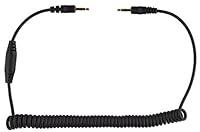
- Wireless & Wired - By connecting the receiver to the camera, the timer can be used as a wireless remote control to remotely control the receiver.Use 2.4GHz wireless transmission, distance up to 60M. In addition, the timer can also be directly connected to the camera as a wired remote control.
- Compatible with Nikon Z9, D3, D4, D4s, D5, D6, D800, D850, D800E, D810, D810A, D700, D500, D300, D200, F6, F100, F5, F90X, F90, N90s, D1X, D2H, D3X; Fujifilm S5 Pro, S3 Pro; Kodak DCS-14n